
Two Factor Registration (MEFIRS)
MEFIRS account users assigned to the permission groups below will begin using two-factor authentication to access MEFIRS on January 2, 2025. Two-factor authentication requires users to enter a unique code each time they log in to Elite.
- Affected permission Groups:
- EMS Agency Admin
- EMS Agency Quality Assurance
- EMS Agency Admin with Forms
- Fire/EMS Agency Admin
- Fire/EMS Agency Quality Assurance
- Fire/EMS Agency Admin with Forms
You can use any application that supports TOTP (time-based one-time passwords) to generate authentication codes. For example, you can use Google Authenticator, Microsoft Authenticator, and Authy for two-factor authentication
Two-factor authentication protects accounts by requiring identity verification beyond basic login credentials. Enabling this feature allows Maine EMS to protect PHI/PII, accessible through the MEFIRS system. TOTP is the industry's best standard for persons with high-level access to healthcare data.
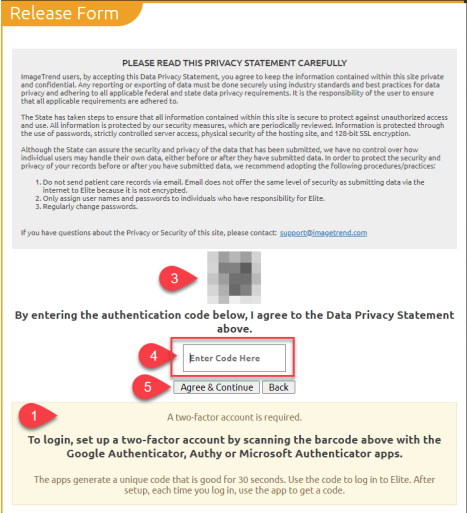
The affected users must authenticate themselves using a code before logging into MEFIRS. Upon logging in, users scan the QR code on the Release Form screen with Google Authenticator, Microsoft Authenticator, or the Authy app for two-factor authentication on a smartphone. The Mobile phone application provides a unique code for users to enter on the Release Form. After their initial login and authentication, users require a code from the app each time they log in
to MEFIRS.
First Login
- Download one of the authentication apps.
- Open the authentication app.
- Scan the QR code.
- Enter the code generated by the app into the "Enter Code Here" box.
- Click "Agree & Continue"
Subsequent Logins
- Open your authentication app.
- Select your MEFIRS login.
- Enter the code into the "Enter Code Here" box.
- Click "Agree & Continue."
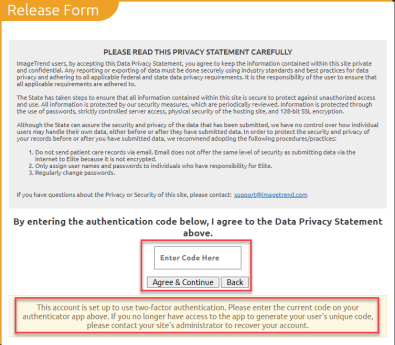
If, for some reason, the user no longer has access to their authentication app, such as a lost or new phone or device. In that case, the user must re-scan the QR code. System administrators at Maine EMS can reset their two-factor authorization through the user's account.